Console
Console
From version 2.3.3 it supports acquiring lock for issues with git prompt that sometimes gets splitted during output.
The mutex name to acquire is ConsoleMtx
Configuration options
| Option | Type | Mandatory | Default | Description |
|---|---|---|---|---|
| Level | String | No | Default Level | Defines the lowest logging level to logged |
| Format | String | No | Default Format | Defines a custom format for the target |
| PrintException | Boolean | No | $true | Prints the stacktrace when an exception object is passed to Write-Log |
| ColorMapping | Hashtable | No | See below | Overrides the default color mappings |
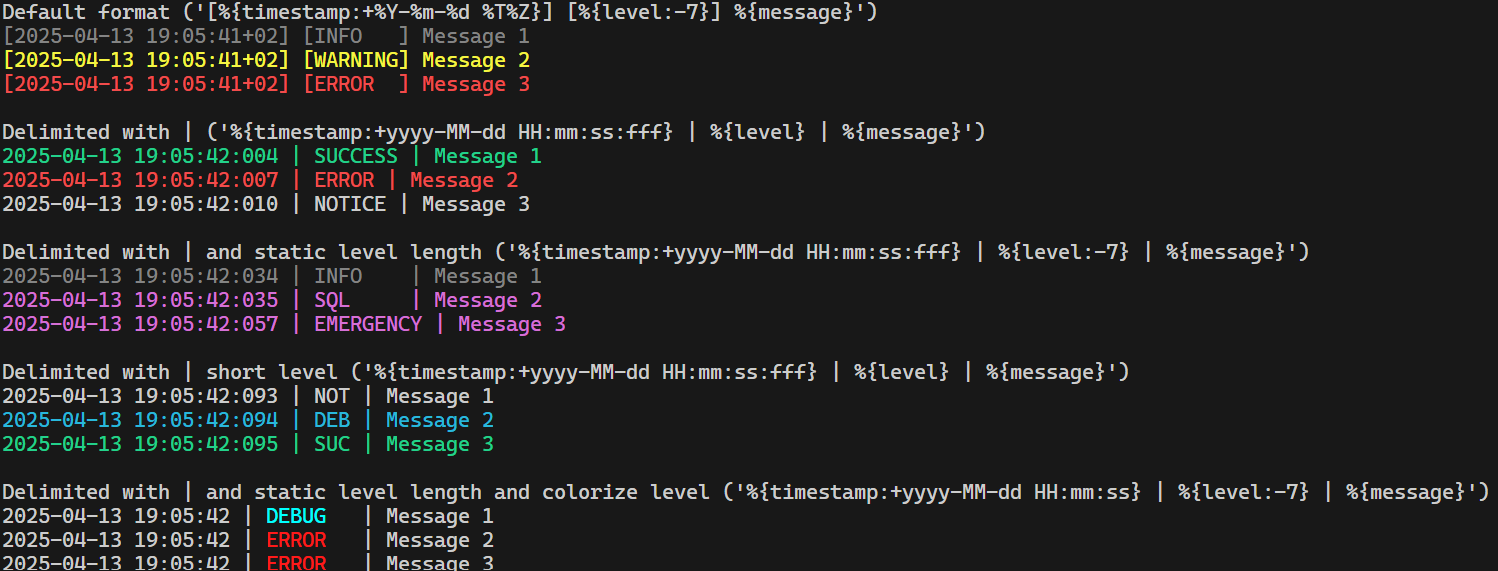
| OnlyColorizeLevel | Boolean | No | $false | If set to true, only the level name is colorized instead of the whole log row. |
| ShortLevel | Boolean | No | $false | If true the written level name is trimmed to three chars, ie ERROR -> ERR. This makes the logs more aligned and easier to read. |
Default color mappings
| Level | Color |
|---|---|
| SQL | Magenta |
| DEBUG | Cyan |
| INFO | DarkGray |
| WARNING | Yellow |
| ERROR | Red |
| NOTICE | Gray |
| VERBOSE | Yellow |
| SUCCESS | Green |
| CRITICAL | Red |
| ALERT | Red |
| EMERGENCY | Magenta |
Each color will be verified against [System.ConsoleColor]. If it is invalid, an error will appear on the screen along with the original message.
Colorize text manually
PSLogs allows you to freely colorize individual parts of the message or variables in the format string. The following two tokens can be used to configure parts of the strings with color.
{StartColor:<color>}{EndColor}
Note that it will only work with OnlyColorizeLevel=$true because if this is $false the whole line is colored which overrides this setting.
You can use it within the message itself:
Write-Log -Level VERBOSE -Message 'This is a verbose {StartColor:Magenta}message{EndColor}'

You can also use it within a format string:
Add-LoggingTarget -Name Console -Configuration @{
    OnlyColorizeLevel = $true
    Format            = '{StartColor:Green}%{timestamp:+yyyy-MM-dd HH:mm:ss}{EndColor} | %{level:-7} | %{message}'
}
Write-Log -Level VERBOSE -Message 'This is a verbose {StartColor:Magenta}message{EndColor}'

Example
Add-LoggingTarget -Name Console -Configuration @{
    Level = 'DEBUG'
    Format = '[%{timestamp}] [%{level}] %{message}'
    PrintException = $false
    ColorMapping = @{
        'DEBUG'   = 'Blue'
        'INFO'    = 'Green'
        'WARNING' = 'Yellow'
        'ERROR'   = 'Red'
    }
    OnlyColorizeLevel = $true
    ShortLevel = $true
}
Format examples